# Query
Bilibili video demo → Area Query & Wastage Query (opens new window)
# Area Query

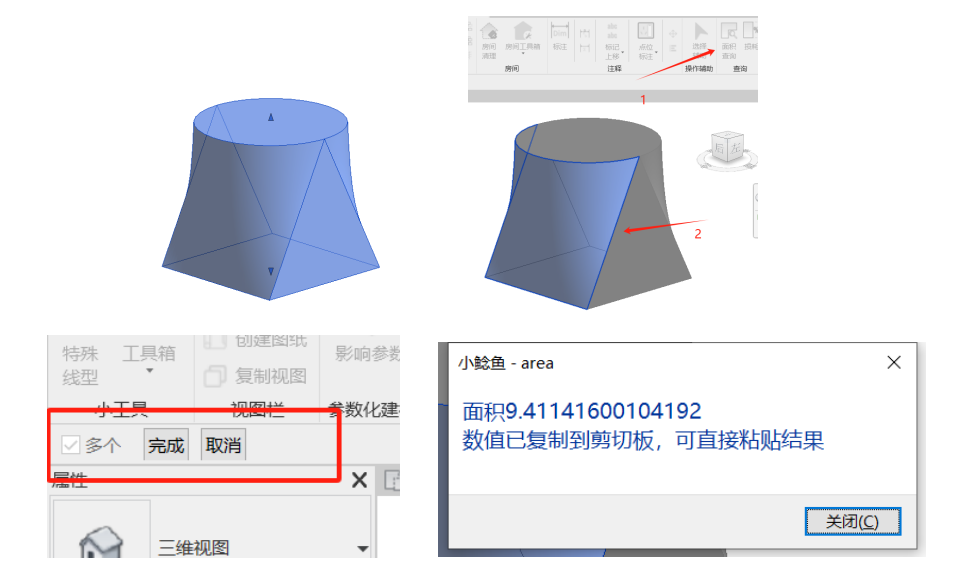
Applied to area queries for irregular surfaces.
Click the function, then click the geometric face to query, then click Finish in the upper left corner to view the area in the window. You can view single queries or click multiple times for combined viewing.
# Wastage

Select multiple finish layers to calculate block material wastage (using the same curtain wall type for calculation).
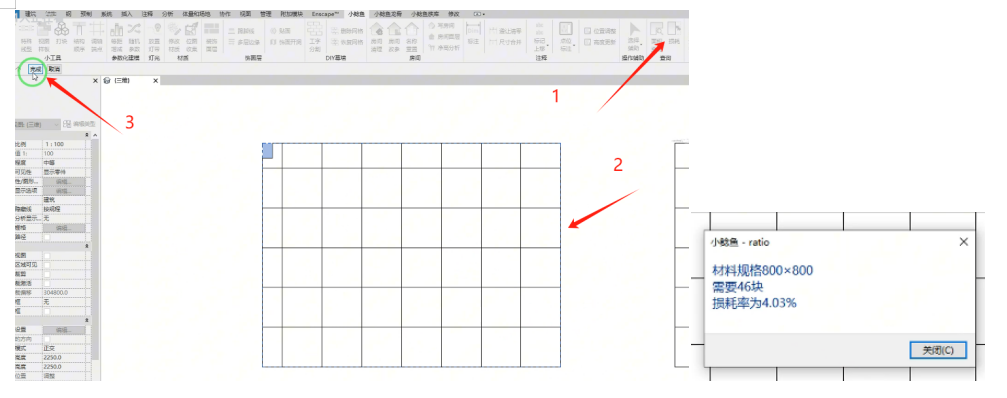
Click the function, select the curtain walls to view, then click Finish in the upper left corner to view. (Wastage query uses the largest panel dimension in the model as the basis for identification and filtering.) You can click different models multiple times for combined querying.
Here, brick cutting is calculated using aligned grain cutting method for wastage, convenient for optimizing paving schemes.
Query bricks of the same specification; different specifications for paving are not applicable.
# Multi-Component Area
Applied to area queries for selected same-category components. Primarily for system families such as walls, floor slabs, roofs, ceilings, etc., that include default area parameters.
Bilibili video demo → Multi-Component Area (opens new window)