# Query
Watch tutorial video on Bilibili → Area Query & Waste Query (opens new window)
# Area Query

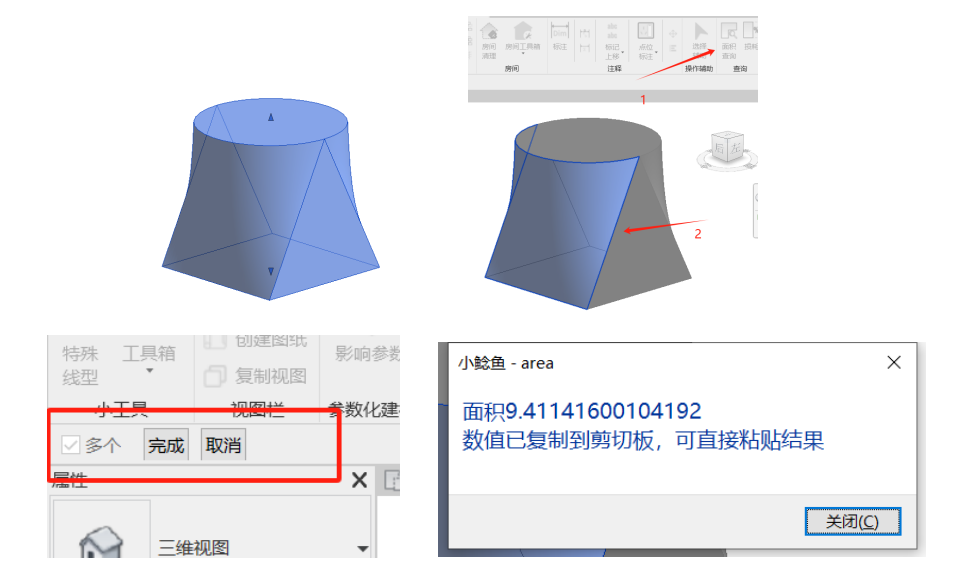
Query the area of irregular surfaces.
Click the function, then click the geometric face to query. Click Finish in the upper left corner to view the area. Can be viewed individually or combined with multiple clicks.
# Waste

Select multiple finish layers to calculate block material waste (calculated using the same curtain wall type).
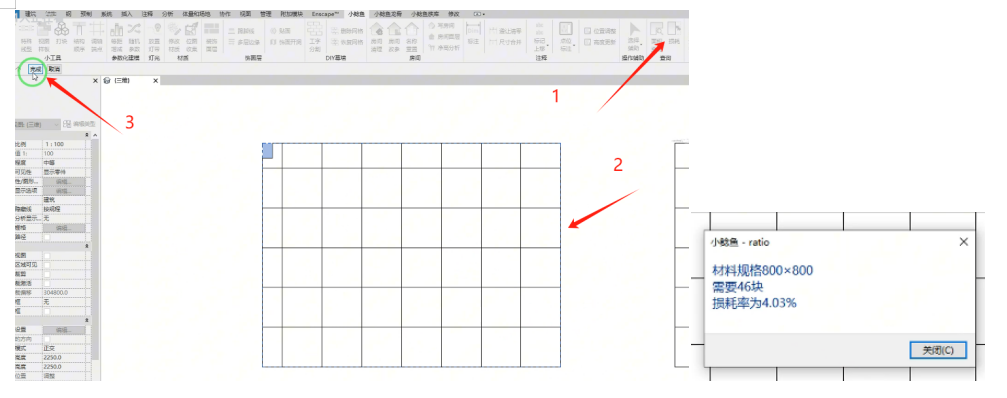
Click the function, select the curtain wall to query, then click Finish in the upper left corner to view. (Waste query identifies based on the largest panel size in the model.) You can click different models multiple times for combined queries.
Brick cutting is calculated based on pattern-aligned cutting for waste optimization.
Only applicable to bricks of the same specification. Different specifications are not supported.
# Multi-Component Area
Query the area of selected same-type components. Mainly for system families such as walls, floors, roofs, ceilings, etc. that have default area parameters.
Watch tutorial video on Bilibili → Multi-Component Area (opens new window)